100% MANAGED BACKUP & RECOVERYMANAGED 24/7/365 BY RED RABBIT SECURITY
Managed backup • Recovery • Governance

Your Data. Protected.Your Backups. Verified.Your Recovery. Proven.

Carrot Vault is a fully managed backup and disaster recovery service from Red Rabbit Security. We monitor your backups 24/7/365, perform recovery verification, and provide documented recovery reports so you know what is protected, what has been tested, and whether your systems are ready to recover.

Back up • Verify • Recover with Red Rabbit Security

Carrot Vault by Red Rabbit Security: a rabbit in a business suit sits on an open vault full of carrots while a rabbit in a red hoodie lies in the foreground
24/7/365Backup monitoring
File + ImageBackup types
IsolatedRecovery testing
CertifiedBy a technician
What Carrot Vault is

A service, not software you have to look after.

Carrot Vault is not backup software you install and look after. It is a service: Red Rabbit Security, a cybersecurity company, operates the backup and recovery program for your organization, from schedules and continuous monitoring to recovery testing and reporting.

A backup that reports “completed” only tells you data was copied. Carrot Vault goes further: Red Rabbit Security restores your backups in isolation, checks the recovered system or files, and a technician certifies the result, so you have documented evidence of recovery before you need it.

Red Rabbit Security manages

  • Backup schedules and frequency
  • Backup policies and retention
  • Continuous backup monitoring
  • Operational response when a backup needs attention
  • Recovery testing
  • Recovery, performed by Red Rabbit Security technicians
  • Recovery verification and certification
  • Reporting
Why it matters

Why managed backup and recovery matters

Most organizations do not lose data because backup is impossible. They lose it because backups were never automated, never watched, never tested, or kept in only one place. These are the risks Carrot Vault is built to close.

Ransomware

Attackers encrypt or destroy files and demand payment. A clean, recoverable copy kept away from the affected computers is how a business comes back without negotiating.

Hardware failure

Drives, laptops and servers fail without warning. A current full-system image turns a dead machine into a restore instead of a rebuild.

Accidental deletion

People overwrite or delete the wrong file every day. Scheduled file-level backups let a single file or folder be brought back.

Outages and disasters

Power, fire, flood and theft can take a site offline. Off-site copies and a tested way back keep the business moving.

Backups nobody tested

A backup that was never restored is an assumption. Carrot Vault restores backups in isolation on a regular testing schedule, and a technician certifies the result.

One copy in one place

A single copy is a single point of failure. Supported configurations combine on-premises and off-site storage for a 3-2-1 design.
What we protect

Protection for every computer you depend on

Every protected computer is covered by its own subscription and its own storage allocation.

File-level backup

The files and folders that matter, backed up on a managed schedule and encrypted before they leave the computer. Individual files can be recovered without restoring a whole system.

Full-system image backup

The complete computer: operating system, applications, settings and data, so a failed or lost machine can be recovered to the same or replacement hardware, or to a virtual machine.

Cloud/SaaS backup

Backup of Microsoft 365, Google Workspace and Dropbox data, managed alongside your computers. Restore options differ by service.

Windows workstations and servers

Windows 11 desktops and laptops, Windows Server, and Ubuntu Linux servers. Each protected computer has its own subscription and storage.
How it fits together

One managed service, from your computers to the proof

Carrot Vault backs up each protected computer, keeps the backups in managed storage, and Red Rabbit Security operates every part of it. You see the results.

Managed by Red Rabbit SecuritySchedules · policies · retention · continuous monitoring and response · recovery testing · reporting
Your computers
WorkstationsWindows 11 desktops and laptops
ServersWindows Server and Ubuntu Linux servers
Carrot Vault backups
File-level backupFiles and folders, encrypted before they leave the computer
Full-system image backupOperating system, applications, settings and data, encrypted before they leave the computer
Managed storage
Off-site cloud storageEncrypted cloud backup; immutable storage for supported backup types
On-premises storageFor file-level backups in supported configurations, for 3-2-1 designs
You: status, recovery results and reports in the Customer Portal, without administering any of it.
Backup is not recovery

A completed backup is not proof of recovery.

Traditional backup tells you data was copied. Carrot Vault demonstrates that a computer can actually be brought back, and shows you the evidence.

Traditional backup

“Backup completed”

✓Data was copied to backup storage
–The backup was restored in isolation, away from your production computers
–Image tests: the restored system started and reached its sign-in screen
–File tests: restored files were compared with the backup
–A technician reviewed the evidence and certified the result
–A formal recovery report you can keep was issued
Carrot Vault

Verified Recovery

✓Data was copied to backup storage
✓The backup was restored in isolation, away from your production computers
✓Image tests: the restored system started and reached its sign-in screen
✓File tests: restored files were compared with the backup
✓A technician reviewed the evidence and certified the result
✓A formal recovery report you can keep was issued
Our process

Scheduling, monitoring and recovery testing

Red Rabbit Security configures how often each computer is backed up to your requirements, monitors every backup, and responds when one fails or a computer stops backing up. Recovery is tested, not assumed.

1

Back up

File and full-system image backups run on the schedule Red Rabbit Security manages for you.
2

Monitor

Every backup is monitored continuously. When one needs attention, Red Rabbit Security responds.
3

Restore

On a regular testing schedule, backups are restored in isolation, never onto your production computer.
4

Verify

The restored system or files are checked, and a technician reviews the evidence.
5

Certify & report

Only a test a technician has certified is shown as passed, with a report you can keep.
Backup monitoring

Every backup is monitored, and someone responds.

A backup schedule only protects you while it keeps running. Carrot Vault monitors every backup of every protected computer continuously, 24/7/365: job results, failures, and the health of each computer's backup agent. When a backup fails, or a computer stops backing up, Red Rabbit Security responds, instead of leaving an alert for you to notice.

Managed schedules

How often each computer is backed up is set and maintained for you.

Operational response

A backup that needs attention is handled by Red Rabbit Security.
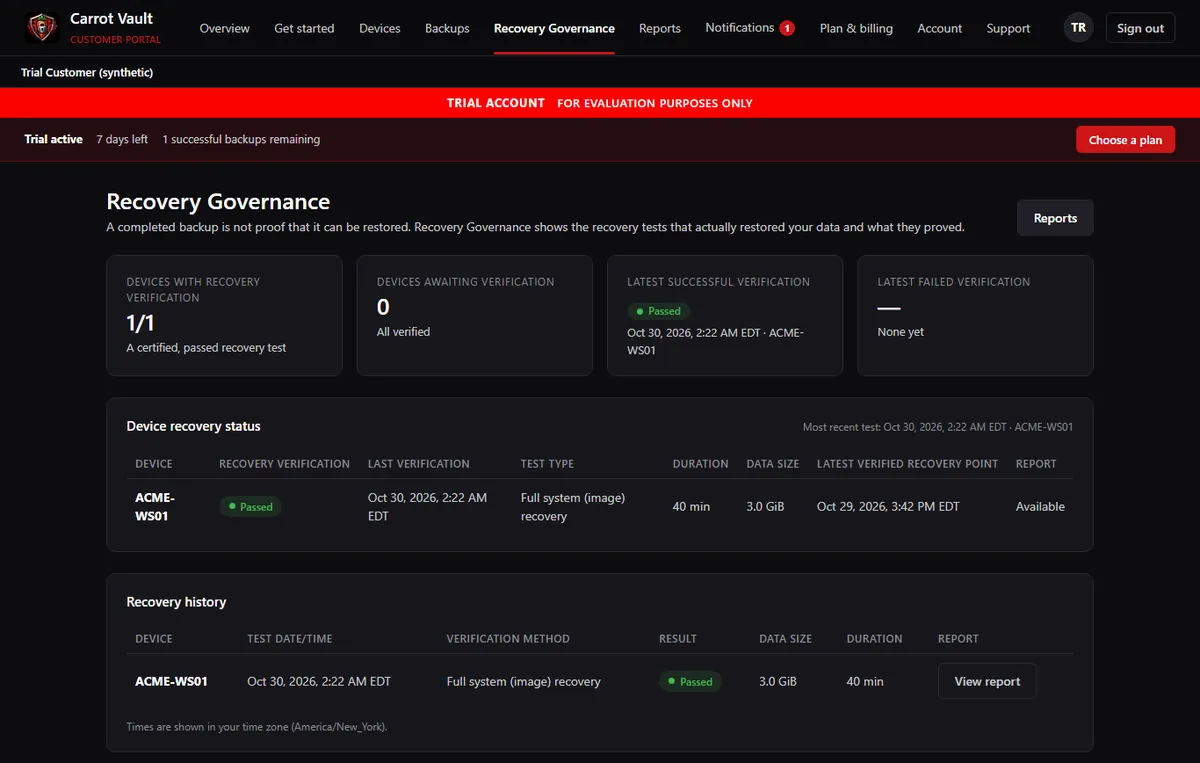
The Recovery Governance screen of the Carrot Vault Customer Portal, shown with synthetic sample data

The Customer Portal's Recovery Governance screen, shown with synthetic sample data, not a real customer.

Recovery Governance

The program, and the proof

Recovery Governance is how Red Rabbit Security runs your recovery readiness. Verified Recovery is the Recovery Compliance testing process that shows a backup can be recovered. Tests run on the schedule set for each computer; not every individual backup is restored and tested.

Recovery Governance

Our managed recovery program: oversight of your backup policies, monitoring, recovery readiness, isolated restore testing, technician review, certification, evidence and reporting.

Verified Recovery

The restore, testing and certification process itself. Each Recovery Compliance test restores a backup in isolation, records the evidence and produces a recovery report. A result is shown as verified only after a Red Rabbit Security technician has reviewed and certified it.
The proofAn untested backup is never described as verified.
Customer visibility

See your protection. Never administer it.

You do not administer the backup infrastructure. The Customer Portal is where you see the state of your protection: your protected computers, recovery results and the formal reports. Only certified results count as passed. You decide what is protected; to change schedules, policies or coverage, you tell Red Rabbit Security and we make the change.

What you receive

  • Status of every protected computer
  • Backup results and recovery test results
  • Certified recovery reports you can keep
  • Plan and storage change requests
  • A team to ask for any other change
What you do not have to doInstall, configure, monitor or repair backup infrastructure.
Storage design

3-2-1 backup strategies

The 3-2-1 rule keeps three copies of your data, on two different types of storage, with one copy off-site. Supported Carrot Vault configurations can implement a 3-2-1 strategy, and supported backup types can be kept in immutable storage. Red Rabbit Security designs the configuration with you; not every deployment is 3-2-1 automatically.

3

copies of your data

Your live data plus two backup copies.
2

kinds of storage

For example, on-premises storage and cloud storage.
1

copy off-site

Off-site cloud storage, which can be immutable storage for supported backup types.
The Red Rabbit Security team
Red Rabbit Security

Operated by a cybersecurity company.

Carrot Vault is built and run by Red Rabbit Security. The people who design your backup configuration are the people who monitor it, respond when something needs attention, carry out recoveries and certify recovery tests. There is no hand-off to software you have to operate yourself.

Pricing
$70 per protected computer / month

Each computer has its own subscription with 1 TB of backup storage and fully managed protection. $50 per additional TB of backup storage, per month. Volume pricing from five licenses.

See pricing
Free trial

Seven days, fully managed

Up to 500 GiB, one successful file-level or image backup and one recovery verification test. Cloud/SaaS backup and immutable storage are not included in the trial.

Free trial details

Software authenticity

The Carrot Vault Windows installer is digitally signed through Microsoft Artifact Signing. The signature identifies the publisher as Red Rabbit Security, LLC. Before you install, open the installer's Properties, choose Digital Signatures, and confirm that publisher name.

The signature confirms who published the file and that it has not been altered since signing. It is not an endorsement of Carrot Vault by Microsoft.

Know you can recover.

Start with the free trial, or talk to us about protecting your organization.

Start Free TrialSee Pricing
Contact

Talk to Red Rabbit Security

Questions about Carrot Vault, pricing or protecting your organization? Call or e-mail our team.

Phone
Phone number

OUTSMART • OUTPACE • OUTLAST